Thursday, March 1, 2012


Tears of a Bride

I took the above photograph as part of a Photography Workshop call WOW-8 (White Outdoor Wedding) photo shoot sponsored by Photo Binder and One Talent Source. The Workshop was scheduled to start at 3:00 pm and my wife and I arrived at the Brazos Bend State Park in Needville, Texas for 2:30 pm. Unfortunately when we drove up to the State Park it was raining. Fortunately it only rained for about an hour. When we started the photo shoot everything was wet and it was dark with overcast skies. Even though the conditions were not ideal there is always an opportunity for photography if you look for them. The models, hair styles and makeup artist were great. They did not complain about the weather are the wet conditions.  As soon as it stop raining the models went right to work providing awesome photographic opportunities for the photographers. With the help of the model, I took advantage of the wet mirror in an effort to portray an image of a brides’ unfulfilled moment.

I had never worked with professional models before until this workshop. From this experience I high recommend that if you get an opportunity to work with professional models jump on it. A professional model will make your work interesting and rewarding.

For more information see: Brazos Bend State Park and The Photo Binder

See my Facebook page for additional Photography and Photographic Art discussions.

To view my Photographic Art visit: Windows of Photography

Technical Data: Nikon D3 with a Nikon NIKKOR AF-S 24-120mm f/3.5-5.6G lens, Subject Distance: Infinity, Exposure: 1/160s at f/8.0, ISO: 640, Focal Length: 62mm, Filter: Ultra Violet, Lighting: Natural Daylight, Post Processing: Adobe Photoshop CS5 and Nik Color Efex Pro 4, Date: 02/25/2012 at 4:37 pm

Copyright © 2012 Windows of Photography, All Rights Reserved

Monday, February 20, 2012


Laissez les bons temps rouler
(Let the Good Times Roll)

The above photograph is a small piece of a fantastic window display from a boutique called Razzle Dazzle. Razzle Dazzle is located at 524 Royal Street in the French Quarter of New Orleans. In my opinion Razzle Dazzle is a shopping destination when in New Orleans. Razzle Dazzle has very unique gifts and holiday items and ideas.

The photograph above and this blog are in celebration of Mardi Gras 2012. I photographed this image through a glass display window. To eliminate reflections and ghosting in the image I used a Circular Polarizer Filter. Even though a Polarizer Filter helps a great deal you also need to find the best angle to shoot your image. I also had to pump-up the ISO to 640 because the window was in fairly dim light. Now go out and shoot a window display.

For more information see: Razzle Dazzle and Wikipedia - Mardi Gras
 
See my Facebook page for additional Photography and Photographic Art discussions.

To view my Photographic Art visit: Windows of Photography

Technical Data: Nikon D3 with a Nikon NIKKOR AF-S 24-120mm f/3.5-5.6G lens, Subject Distance: 0.67 meters, Exposure: 1/25s at f/6.3, ISO: 640, Focal Length: 78mm, Filter: Circular Polarizer, Lighting: Natural Daylight, Post Processing: Adobe Photoshop CS5, Date: 01/17/2012 at 9:01 am

Copyright © 2012 Windows of Photography, All Rights Reserved

Monday, February 6, 2012


Frozen Grace

I took the above photographs at the Audubon Nature Institute in New Orleans in 2009. The top photograph is what you might classify as a standard photograph. Although I think it’s pretty good and certainly not standard. I used ACDSsee Photo Manager 12 for the post processing of the image. The bottom photograph is the same photograph but I processed it in ACDSee Photo Manager 12 as a HDR (High Dynamic Range) image using three consecutive images with an Exposure Value (EV) of +/- 1.0. HDR processing can produce a more surreal looking photograph but, most of the time I prefer an image that is realistic looking. What I like about HDR photography and its post processing is the ability to produce a more 3-Dimensional image. Even though I captured the above HDR photograph using a hand held technique (tucking my elbows in to my sides), I strongly recommend using a tripod for stability. I also recommend using a remote shutter release trigger. When shooting HDR images it is very important to take your time. Look through your camera’s view finder and envision the final results. Think about where your light source is coming from and how this will affect your final image. But, as always, have fun with your photography.

For more information about HDR Photography and the Audubon Nature Institute see the links below:

To learn more about HDR Photography see the Pixiq and HDR Cream web-sites.

See my Facebook page for additional Photography and Photographic Art discussions.

To view my Photographic Art visit: Windows of Photography

Technical Data: Nikon D3 with a Nikon NIKKOR AF-S 70-300mm f/4.5-5.6G lens, Subject Distance: 6.31 meters, Exposure: 1/60s at f/5.0, ISO: 200, Focal Length: 180mm, Filter: Ultra Violet, Lighting: Natural Daylight, HDR: Yes, Bottom Image, Post Processing: ACDSee Photo Manger 12, Date: 08/05/2009 at 11:22 am

Copyright © 2012 Windows of Photography, All Rights Reserved

Wednesday, February 1, 2012


Nik Software - Silver Efex Pro 2

At the 2012 ImageUSA Image Expo in New Orleans I purchased Nik Software's Complete Collection (Professional Photographic Tools). Within the Complete collection of software plug-ins for Adobe's Photoshop and Lightroom there is Nik Software's Silver Efex Pro 2. Silver Efex Pro 2 is a Black and White imaging processing software tool. It has over three dozen presets which can make for a great starting point when creating a Black and White image. This software also features the use of Control Points. With a Control Point or Points you can selectively spot process desired areas of your image. The Control Point feature is a very nice tool to have in your tool box. Silver Efex Pro 2 also has a set of adjustable Color Filters, Film Types and Finishing Adjustments tools. Silver Efex Pro 2's extensive features and adjustments allow the photographer the ability to create the exact Black and White image they had envisioned. Nik Software also provides Live Training and On Demand Videos of their products for members over the Internet. You should take the time to learn your software tools, and experiment with them, break the rules. Who knows, you may even invent a new rule.

While at the Expo in New Orleans I took the above photograph of a statue of President Andrew Jackson in Jackson Square. First I processed the color image in Adobe's Photoshop Bridge and then I saved it. Secondly I used one of Silver Efex Pro 2's presets and then i used several Control Points to increase the white and contrast effects of the clouds. And, then I saved this image with a different file name. I always preserve the original NEF (Nikon Electronic Format) image file for future processing. Nikon Electronic Format is Nikon's RAW file format that features image information and metadata received from the camera's sensors.

To learn more about Silver Efex Pro 2 visit: Nik Software's website

To learn more about President Andrew Jackson and Jackson Square, New Orleans, see the links below:
 
Also, see Widipedia to learn more of Andrew Jackson and Jackson Square (New Orleans, Louisiana).

See my Facebook page for additional Photography and Photographic Art discussions.

To view my Photographic Art visit: Windows of Photography

Copyright © 2012 Windows of Photography, All Rights Reserved

Sunday, January 29, 2012


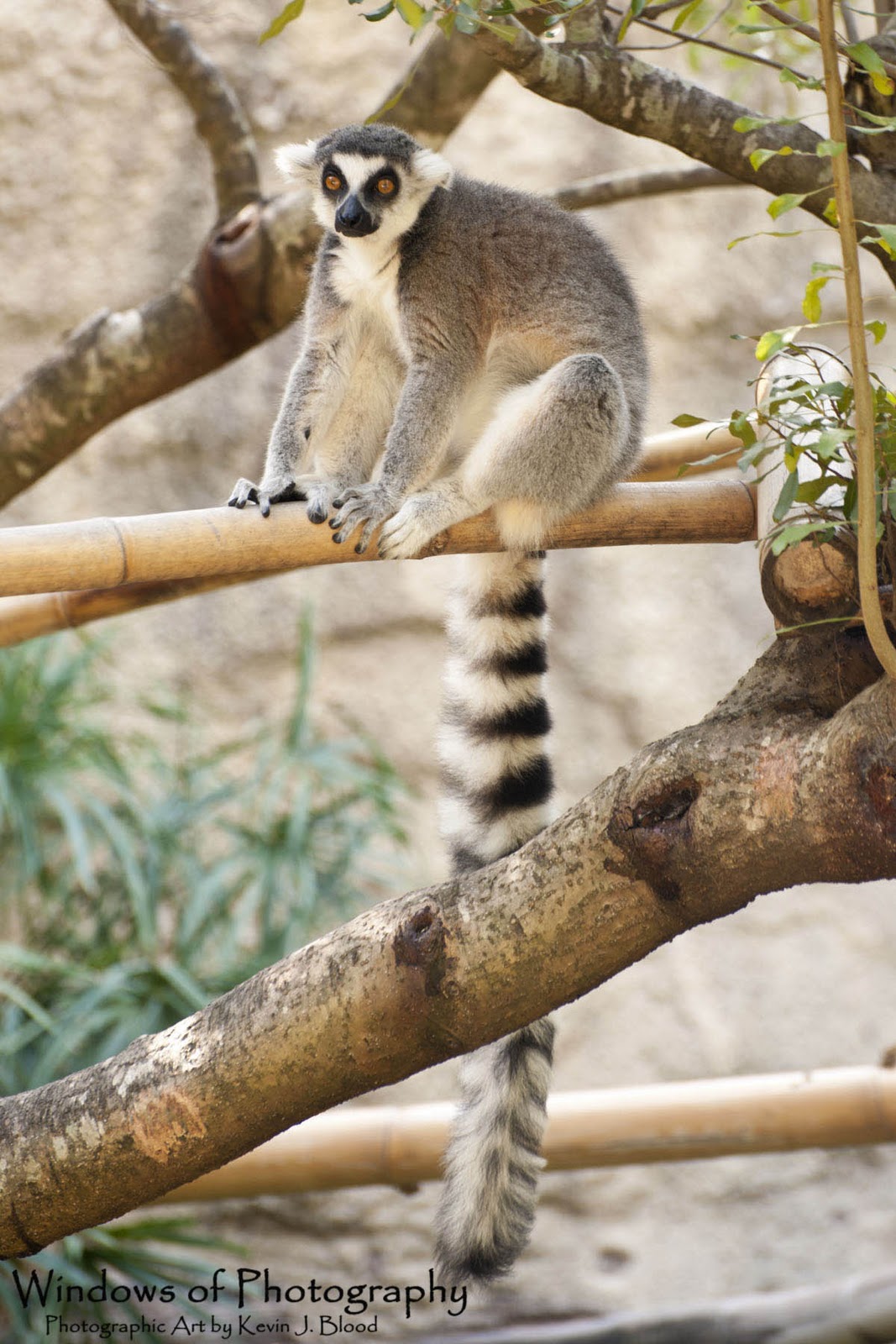
Ring-tailed Lemur

I captured this image of a Ring-tailed Lemur at the Houston Zoo in 2011. The Ring-tailed Lemur is originally from the island of Madagascar. Ring-tailed Lemurs are quite intelligent and very social, living in large groups. Lemur groups are also leaded by a matriarch. All Lemurs have a strong sense of smell and they use scent glands to mark their territory. Lemurs are also very vocal. They will use calls among each other to signal alarms and to maintain group cohesion. As a species the Lemur is considered Near Threatened by the International Union for Conservation of Nature (IUCN) Red List.

To learn more about the Ring-tailed Lemur visit Wikipedia. Also, visit the web-site of the IUCN to learn more about the International Union for Conservation of Nature.

See my Facebook page for additional Photography and Photographic Art discussions.

To view my Photographic Art visit: Windows of Photography


Metadata: Nikon D3 with a Nikon NIKKOR AF-S 70-300mm f/4.5-5.6G lens, Subject Distance: 5.62 meters, Exposure: 1/10s at f/5.6, ISO: 200, Focal Length: 155mm, Filter: Ultra Violet, Lighting: Natural Daylight, Post Processing: Adobe Photoshop CS5, Date: 10/11/2011 at 10:26 am

Copyright © 2012 Windows of Photography, All Rights Reserved

Friday, January 13, 2012


Fox Squirrel

While on an outing to the Houston Zoo with my wife I captured the above image of a Fox Squirrel. Fox Squirrels are the largest specie of tree squirrels native to North America. The Fox Squirrel can easily be mistaken for the American Red Squirrel or the Eastern Gray Squirrel. There were Fox Squirrels all around the Houston Zoo but, they were very hard to photograph because they would run and hide every time I pointed my camera at them. I guess they looked at my 70-300mm telephoto lens and thought better safe the sorry. As we turned a corner I saw the above squirrel preoccupied with eating. I had to slowly and smoothly swing my camera into place for the shot. I was only able to get this one image of this squirrel before it was gone. But I got lucky and it made for a great photograph. When photographing wildlife even in a zoo it pays to be ready at all times.

See the following Wikipedia link to learn more about the Fox Squirrel.

See my Facebook page for additional Photography and Photographic Art discussions.

To view my Photographic Art visit: Windows of Photography

Metadata: Nikon D3 with a Nikon NIKKOR AF-S 70-300mm f/4.5-5.6G lens, Subject Distance: 5.01 meters, Exposure: 1/10s at f/5.6, ISO: 200, Focal Length: 220mm, Filter: Ultra Violet, Lighting: Natural Daylight, Post Processing: Adobe Photoshop CS5, Date: 10/11/2011 at 10:20 am

Copyright © 2012 Windows of Photography, All Rights Reserved
Tuesday, January 10, 2012


Royal Poinciana

During a trip to Waikoloa Village on Hawaii's Big Inland I took the above photograph of this Royal Painciana. The Royal Poinciana were not as full of flowering blooms as I wished but, sometimes you have to work with what you get. One of the best parts of this image beside the red of the blooms and the different shadings of the green leaves was the blue of the sky. I obtained this nice blue sky by using a Circular Polarizer filter. As I have stated in past blogs a Circular Polarizer filter can make the sky in your images a more natural and truer blue by reducing the harsh light from the sun. A Circular Polarizer is also great for reducing the glare and hotspots from reflective materials such as water and class. To use a Circular Polarizer filter is very easy. Just turn the Circular Polarizer filter until the image in your view finder is at its darkest. I have a Circular Polarizer filter for each of my lens.

Delonix Regia (Royal Poinciana): A native of Madagascar, but grows freely in many other places such as Hawaii, where it is also known as the Flamboyant Tree, Mohur Tree and Red Flame. It blooms in about July or August usually and can reach 40-80 feet, spredding out to the side as well as high.

See the following Wikipedia link to learn more about the Royal Poinciana.
 
See my Facebook page for additional Photography and Photographic Art discussions.

To view my Photographic Art visit: Windows of Photography


Technical Data: Nikon D3 with a Nikon NIKKOR AF-S 24-120mm f/3.5-5.6G lens, Subject Distance: 5.96 meters, Exposure: 1/80s at f/5.0, ISO: 200, Focal Length: 58mm, Filter: Circular Polarizer, Lighting: Natural Daylight, Post Processing: ACDSee Photo Editor 2008, Date: 07/28/2010 at 10:32 am

Copyright © 2012 Windows of Photography, All Rights Reserved

Thursday, January 5, 2012


What's up Pussycat?

I captured the above photograph of this Lioness at the Audubon Nature Institute in 2009 during a trip to New Orleans. The Lioness looks as if she could have been photographed in the wild. When photographing wildlife at a zoo I'm looking for exhibits that frame the animals in as natural a setting as possible. Wildlife and photographers have one thing in common. They don't like bars and wired enclosures. The best zoos have large enclosures with high stone walls (usually man-made), native plan life and moats to protect you from the wildlife on exhibit. Animals that are in large natural enclosures experience less stress and live a more satisfied life which translates into better photographs.

In my humble opinion the Audubon Nature Institute in New Orleans is one of the best zoos in the United States. The exhibits are very photographer friendly. Most of the wildlife exhibits are natural and realistic. The Audubon Nature Institute is also known for its diverse plant life.

For more information visit the Audubon Nature Institute's web-site.


See my Facebook page for additional Photography and Photographic Art discussions.

To view my Photographic Art visit: Windows of Photography


Metadata: Nikon D3 with a Nikon NIKKOR AF-S 70-300mm f/4.5-5.6G lens, Subject Distance: 17.8 meters, Exposure: 1/30s at f/5.6, ISO: 400, Focal Length: 300mm, Filter: Circular Polarizer, Lighting: Natural Day Light, Post Processing: ACDSee Photo Editor 2008, Date: 08/05/2009 at 11:16 am

Copyright © 2012 Windows of Photography, All Rights Reserved

Friday, December 30, 2011


Happy New Year!!! (2012)

If 2011 has been a little rough for you as it has been for many this year, remember that New Year's Eve represents an ending, while at the same time it also represents a new beginning. As the clock strikes twelve you can set new goals, fix wrongs or just make your life a little more meaningful by helping someone else who needs it. And, even if you have had a great 2011, may you have an even better New Year in 2012.

I edited the above photograph using Adobe Photoshop CS5 Bridge. I moderately increased the Color Temperature, Contrast and the Blacks of the image. Then I moderately decreased the Clarity and Color Saturation to give the image a slightly dreamy look. When using a digital photo editor remember to have fun. Try different configurations to learn what works and how to use them. Also, remember to always save your edited image with a different file name so you can preserve the original photograph for future editing. I can promise you one thing; you will be pleased and amazed at what you can produce in a digital photo editor.

New Year's Eve is observed on December 31, the final day of any given year in the Gregorian calendar. New Year's Eve is ofter celebrated at social gatherings, during which participants dance, eat, consume alcoholic beverages and watch or light fireworks to mark the incoming year. (Information source: Wikipedia)

For more information about New Year's Eve see the Wikipedia link below:


Visit my web-site: “Windows of Photography” to see more of my photographic art.

Technical Data: Nikon D3 with a Nikon NIKKOR AF-S VR Macro 105mm f/2.8G IF-ED lens, Subject Distance: 2.0 meters, Exposure: 1/60s at f/5.6, Focal Length: 105mm, Filter: Ultra Violet, Lighting: Nikon SpeedLight SB-800 (slave unit) with an Amber Diffuser Flash Cover and a Nikon Wireless SpeedLight commander SU-800 (master unit), Post Processing: Adobe Photoshop CS5 Bridge, Date: 12/30/2011 at 11:12 am

Wednesday, December 21, 2011


Merry Christmas Frosty (2011)

Merry Christmas Frosty! I had a desire to add to my 2011 Christmas images. I used my Nikon D3 and Nikon NIKKOR AF-S VR Macro 105mm f/2.8 lens. If you dial this lens in correctly it will produce outstanding images with a great depth of field. That being said, the original image seemed a tad-bit flat to me. So I used Adobe's Photoshop CS5 Bridge to quickly sharpen the edges and to strengthen the color saturation.

"Frosty the Snowman" is a popular song written by Walter "Jack" Rollins and Steve Nelson, and first recorded by Gene Autry and the Cass Country Boys in 1950. (Information Source: Wikipedia) My favorite version was sung by Burl Ives.

For more information on the origins of Frosty the Snowman see the link below:

http://en.wikipedia.org/wiki/Frosty_the_Snowman

Visit my web-site: “Windows of Photography” to see more of my photographic art.

Technical Data: Nikon D3 with a Nikon NIKKOR AF-S VR Macro 105mm f/2.8G IF-ED lens, Subject Disteance: 1.0 meters, Exposure: 0.4s at f5.6, Focal Length: 105mm, Filter: Ultra Violet, Post Processing: Adobe Photoshop CS5 Bridge, Date: 12/21/2011 at 12:14 pm

Tuesday, December 13, 2011


Assassin Bug

The above photograph of an Assassin Bug was taken Thanksgiving day in Lake Charles, Louisiana using a Nikon D3 with a Nikon NIKKOR AF-S VR Macro 105mm f/2.8 lens. The above Assassin Bug may not look like a predator but it is. Fully-grown Assassin Bugs can range from 4 to 40 millimeters. The above Assassin Bug looked to have been about 25 millimeters (1.0 inches). Assassin Bugs have a long rostrum (feeding tube) which they use to inject lethal saliva to liquefy the insides of their prey for feeding. Assassin Bugs colors can range from brown, black, red and orange.

For more information about the Assassin Bug see the link below:

http://en.wikipedia.org/wiki/Assassin_Bug

I had recently purchased a Nikon NIKKOR AF-S VR Macro 105mm f/2.8 lens.  Simply put, I love this lens! But, evan though this is a great lens it is not a forgiving lens. The focal point can be very small and tight (macro) and you must use a tri-pod (maybe a mono-pod could work). I have also read that this NIKKOR lens is a very good portrait lens.

For more information about Nikon's Macro 105mm lens see the link below:

http://www.nikonusa.com/Nikon-Products/Product/Camera-Lenses/2160/AF-S-VR-Micro-NIKKOR-105mm-f%252F2.8G-IF-ED.html

Visit my web-site: “Windows of Photography” to see more of my photographic art.

Technical Data: Nikon D3 with a Nikon NIKKOR AF-S VR Macro 105mm f/2.8G IF-ED lens, Subject Distance: 0.4 meters. Exposure: 1/500s at f/5.6, Focal Length: 105mm, Filter: Ultra Violat, Post Processing: Adobe Photoshop Lightroom 3, Date: 11/24/2011 at 12:44 pm

Tuesday, December 6, 2011


African White Rhinoceros

I took the above photograph of this White Rhinoceros in the late morning heat of August 2009 at the Audubon Nature Institute in New Orleans. By noon most of the animals are looking for a shady place to settle down like the above rhino. The only thing that I did to the above photograph was to crop the image in closer to the subject to bring out the details and to add interest. Sometimes you can improve a photograph by cropping the image which can eliminate distractions and focus on your desired intentions.

The word rhinoceros is derived through Latin from the Ancient Greek which is composed of (rhino - "nose") and (keras - "horn"). The plural in English is rhinoceros or rhinoceroses. The White Rhinoceros are actually gray. The name White Rhinoceros was actually a mistake, or rather a corruption of the word ("wide" in Afrikaans), referring to their square lips. (Informational Source: Wikipedia).

See Wikipedia for more information regarding Rhinos.
 
See my Facebook page for additional Photography and Photographic Art discussions.
 
To view my Photographic Art visit: Windows of Photography

Metadata: Nikon D3 with a Nikon NIKKOR AF-S 70-300mm f/4.5-5.6G lens, Subject Distance: 17.8 meters, Exposure: 1/320s at f/4.8, Focal Length: 140mm, Filter: Circular Polarizer, Post Processing: ACDSee Photo Editor 2008, Date: 08/05/2009 at 11:49 am
 
Copyright © 2011 Windows of Photography, All Rights Reserved

Saturday, December 3, 2011


A Nice Nymphaeaceae (Water Lily)

The above photography is another example of what a Circular Polarizer filter can do for your images. The image of the above Water Lily (Nymphaeaceae) was taken at 11:00 am on a clear sunny day in Waikoloa, Hawaii. The sun's glare coming of the water was very strong and would have created light flairs in the image if I had not been using a Circular Polarizer filter. Besides making the sky in your images an appealing deep blue a Circular Polarizer filter can also reduce are eliminate glare and unwanted reflections in your images. In this case I slowly turned my Circular Polarizer filter until the glare dissipated in my view finder and then I framed the Water Lily for the shot. You should always have a Circular Ploarizer filter in your bag for each of your lens.

For more information about Water Lilies see the Wikipedia link below:

http://en.wikipedia.org/wiki/Nymphaeaceae

Visit my web-site: “Windows of Photography” to see more of my photographic art.

Technical Data: Nikon D3 with a Nikon NIKKOR AF-S 24-120mm f/3.5-5.6G lens, Subject Distance: 1.19 meters, Exposure: 1/200s at f/8.0, Focal Length: 120mm, Filter: Circular Polarizer, Post Processing: ACDSee Photo Editor 2008, Date: 07/28.2010 at 11:00 am

Tuesday, November 8, 2011


Bicycles Built for Two

The above photographs illustrate just one example of what you can do in Adobe's Photoshop. The top photograph is the original image I took when walking through the French Quarter in New Orleans with my wife and daughter. On the top photograph I had only done the usual fine tuning adjustments using Photoshop CS5.

With the bottom photograph I got a bit more creative. First I isolated the red tones by using the >Select >Color Range pull-down tab menu at the top of Photoshop's editor. I used the Eyedropper Tool in the Color Range to select just the red tones in the bicycle. I adjusted the Range slide tool until only the red tones were visible and everything else was black. The Color Range tool also picked-up some of the red in the bricks. Then I uses the >Image >Adjustments >Invert pull-down tab menu at the top of Photoshop's editor to reverse the images selected red tones. With Invert selected everything outside of the selected red tones will be affected by Photoshop's editing options. Under the >Image >Adjustments >Black & White adjustments pull-down tab I was able to create a black and white photograph while not affecting the red tones in the image. I then painstakingly painted in all of the other colors back onto the bicycle only using the Eyedropper Tool and the Color Replacement Tool on the left side photo edit bar. When using the Color Replacement Tool the Zoom Tool comes in very handy for the details.
 
See my Facebook page for additional Photography and Photographic Art discussions.

To view my Photographic Art visit: Windows of Photography


Technical Data: Nikon D3 with a Nikon NIKKOR AF-S 24-120mm f/3.5-5.6G lens, Subject Distance: Infinity, Exposure: 1/30s at f/5.6, Focal Length: 120mm, ISO: 200, Filter: Circular Polarizer, Post Processing: Adobe Photoshop CS5, Date: 08/04/2009 at 8:20 am

Copyright © 2011 Windows of Photography, All Rights Reserved

Friday, October 21, 2011


Silverback Gorilla

Are you looking at me? ARE YOU LOOKING AT ME!  This male Siverback Gorilla has attitude. After getting this one set of HDR (High Dynamic Range) images Mr. Attitude set down and turn his back to everyone and would not turn around for another photographic opportunity. It was as if he stopped to pose for this one photograph and then said that there was going to be no more of that nonsense this morning.

When I am photographing animal species at a zoo are nature institute I find that I get my best results early in the morning. So, I make it a point to arrive just before the zoo or nature institute opens to the public. In most cases the animals have just been fed and released into their public viewing habitats. Also the animals are more active because it tends to be cooler in the early morning hours during the spring and summer months. Once the temperatures start to raise the animals look for a shady spot and then they tend to settle down for the rest of the day.

In my opinion the Audubon Nature Institute in New Orleans, Louisiana is one of the best places in the  country to photograph animals in a more natural setting. The exhibits are well designed for viewers and photgraphers alike without obstructions. The Audubon Nature Institute relies on man-made rack walls and water barriers for many of their exhibts.

To learn more see the Audubon Nature Institute's web-site.
 
See my Facebook page for additional Photography and Photographic Art discussions.
 
To view my Photographic Art visit: Windows of Photography

Metadata: Nikon D3 with a Nikon NIKKOR AF-S 70-300mm f/4.5-5.6G lens, Subject Distance: 11.9 meters, Exposure: 1/640s at f/5.0, Focal Length: 185mm, ISO: 200, Filter: Circular Polarizer, Post Processing: Adobe Photoshop CS5, Merged to HDR Pro: +/- 1 EV, Date: 08/05/2009 at 11:45 am
 
Copyright © 2011 Windows of Photography, All Rights Reserved

Wednesday, October 12, 2011


Old Brick Wall

The above photograph is one of my first HDR (High Dynamic Range) images.  In 2009 I was unaware of HDR photography when I took this image. I was just trying out some of the features of my Nikon D3 camera. Unfortunately, I only bracketed for three images at +/- 1 EV.  When creating a HDR photograph you should use +/- 2 EV at a minimal. On the Nikon D3 that means you need to bracket at least 5 images to get +/- 2 EV. You should also lockup the mirror, close the view finder, use a tripod and a wired or wireless shutter release trigger. You can also use your camera’s timer instead of a remote shutter release trigger. All of that being said, I still like the way this brick-wall came out in the end. This brick-wall in the French Quarter of New Orleans could be over two-hundred years old. Photography may not have existed when this wall was constructed. Like this brick-wall, HDR photography takes planning to setup the shot for results that last over time.

See Wikipedia for or more information on HDR Imaging.

See my Facebook page for additional Photography and Photographic Art discussions.
 
To view my Photographic Art visit: Windows of Photography

Technical Data: Nikon D3 with a Nikon NIKKOR AF-S 24-120mm f/3.5-5.6G lens, Subject Distance: 0.9 meters, Exposure: 1/320s at f/3.5, Focal Length: 24mm, ISO: 200 Filter: UV, Post Processing: Adobe Photoshop CS5, Merged to HDR Pro: +/- 1 EV, Date: 08/04/2009 at 8:29 am
 
Copyright © 2011 Windows of Photography, All Rights Reserved

Tuesday, October 11, 2011


Which way to the restrooms?

Sometimes you just need to have a little sense of humor. I took this photograph in the Vieux Carre (French Quarter), New Orleans. The Vieux Carre is the oldest neighborhood in the city of New Orleans and has an extensive cultural and historic background. You can live in New Orleans all your life and you’ll never run out of subjects to photograph.

Visit Wikipedia for more information on the Vieux Carre (French Quarter).

See my Facebook page for additional Photography and Photographic Art discussions.
 
To view my Photographic Art visit: Windows of Photography

Technical Data: Nikon D3 with a Nikon NIKKOR AF-S 24-120mm f/3.5-5.6G lens, Subject Distance: 1.0 meters, Exposure: 1/60s at f/4.2, Focal Length: 40mm, ISO: 200, Filter: None, Post Processing: ACDSee Photo Editor 2008, Date: 08/04/2009 at 8:11 am
 
Copyright © 2011 Windows of Photography, All Rights Reserved